
Background
Caching is a proven technique to boost application performance by reducing repetitive computations or expensive data fetches. Dot net offers several caching strategies to accommodate various scalability needs:
-
In-Memory Cache: Fast and simple. Stores data in memory on the current server. Ideal for single-instance applications.
-
Distributed Cache: Uses external sources like Redis or SQL Server to share cache across multiple servers. Ideal for cloud-native and scalable architectures.
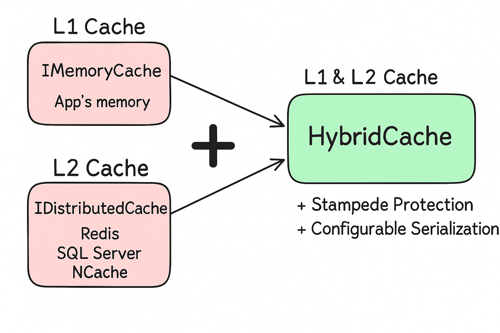
With .NET 9, Microsoft introduces HybridCache —a powerful caching solution that combines the speed of in-memory cache with the scalability of distributed cache. It's a game-changer for developers who want performance and consistency without reinventing the wheel.
Key Features
-
Two-Level Caching: Combines memory speed with distributed reliability.
-
Stampede Protection: Prevents multiple threads from hitting the source simultaneously when data is missing.
-
Tag-Based Invalidation: Group cache entries by tags for easier bulk invalidation.
-
Flexible Serialization: Supports JSON, XML, and other formats.
-
Unified Expiration Control: Manage TTL and refresh policies centrally.
Advantages
-
Blazing Performance – Quickly serve data like API responses and user profiles from in-memory (L1) cache.
-
Reliable Fallback – If L1 cache is unavailable, fallback to distributed (L2) cache to avoid database hits.
-
Auto Syncing – Ensures consistency between local and distributed cache layers across all instances.
-
Unified Expiration Control – Centralized control over cache lifetimes and refresh policies.
-
Manual & Tag-Based Invalidation – Invalidate cache manually or in bulk using tags.
-
Caching API Responses – Reduce latency and load for frequently accessed endpoints.
-
Caching Paginated Results – Improve performance of list views and pagination-heavy data.
-
Caching User Profile Data – Minimize repeated DB access for user-specific data.
-
Manual Cache Invalidation – Clear specific or grouped entries when data updates occur.
-
Caching Aggregated Statistics – Speed up dashboard and analytics queries with precomputed data.
How to Add and Use HybridCache in a .NET App
These steps apply specifically to .NET 9 applications. HybridCache is part of Microsoft.Extensions.Caching.Hybrid namespace, and it integrates seamlessly into the dependency injection (DI) system used in .NET Core and .NET 9.
-
Install the NuGet Package
Use the following command to install the HybridCache package:
Install NuGet Package
dotnet add package Microsoft.Extensions.Caching.Hybrid --version "9.0.0-preview.7.24406.2"Note: HybridCache is currently available in .NET 9 Preview. Ensure your SDK is updated accordingly
-
Configure HybridCache in the Program.cs In your Program.cs or Startup.cs (depending on project type):
HybridCache In Practice
public class WeatherService { private readonly HybridCache _cache; private readonly IHttpClientFactory _httpClientFactory; public WeatherService(HybridCache cache, IHttpClientFactory httpClientFactory) { _cache = cache; _httpClientFactory = httpClientFactory; } public async Task<string> GetWeatherForecastAsync(string city) { return await _cache.GetOrCreateAsync( $"weather:{city}", async cancellationToken => { var client = _httpClientFactory.CreateClient(); var result = await client.GetStringAsync($"https://api.weather.com/{city}"); return result; }, cancellationToken: CancellationToken.None ); } } -
Using HybridCache in Your Code
Once registered in DI, you can inject and use HybridCache in any service or controller:HybridCache In Practice
public class WeatherService
{
    private readonly HybridCache _cache;
    private readonly IHttpClientFactory _httpClientFactory;
    public WeatherService(HybridCache cache, IHttpClientFactory httpClientFactory)
    {
        _cache = cache;
        _httpClientFactory = httpClientFactory;
    }
    public async Task<string> GetWeatherForecastAsync(string city)
    {
        return await _cache.GetOrCreateAsync(
            $"weather:{city}",
            async cancellationToken =>
            {
                var client = _httpClientFactory.CreateClient();
                var result = await client.GetStringAsync($"https://api.weather.com/{city}");
                return result;
            },
            cancellationToken: CancellationToken.None
        );
    }
}
Here are key configuration options you can set globally:
-
MaximumPayloadBytes: The largest size allowed for any cached item (default is 1 MB). Items exceeding this size won't be cached and will be logged.
-
MaximumKeyLength: The maximum length allowed for cache keys (default is 1024 characters). Keys longer than this won't be stored and will be logged.
(Optional) Add Redis as a Distributed Store
If you want to back HybridCache with a distributed store like Redis, register it as follows:Program.cs
builder.Services.AddStackExchangeRedisCache(options =>
{
    options.Configuration = "your-redis-connection-string";
    options.InstanceName = "your-redis-InstanceName-string:";
});
This step is optional because HybridCache can operate using only the in-memory cache if desired.
After these steps, HybridCache is ready to be used in your application!
-
Implementation
-
Dummy API (Simulated external data source)
This simulates an API call to an external service. We'll cache the results of this call using different strategies.Dummy Api
public class DummyApi { private readonly HttpClient _httpClient = new HttpClient(); public async Task<string> FetchDataAsync(string key) { var response = await _httpClient.GetStringAsync("https://jsonplaceholder.typicode.com/comments"); return response; } } -
In-Memory Cache Implementation
We first check the in-memory ConcurrentDictionary. If not found, fetch from API and store in cache.In-Memory Cache
public async Task<string> GetAsync(string key) { if (_cache.TryGetValue(key, out var value)) return value; var data = await api.FetchDataAsync(key); _cache[key] = data; return data; } -
Redis Cache Implementation
We check Redis for the key. On miss, fetch from API and store back in Redis.Redis Cache Implementation
public async Task<string> GetAsync(string key) { var cached = await redisDb.StringGetAsync(key); if (cached.HasValue) return cached; var data = await api.FetchDataAsync(key); await redisDb.StringSetAsync(key, data); return data; } -
Hybrid Cache Implementation
This uses HybridCache to combine local memory + Redis under the hood. Fallback logic is handled by the library.Hybrid Cache Implementation
public async Task<string> GetAsync(string key) { return await _cache.GetOrCreateAsync( key, async cancel => await _api.FetchDataAsync(key), cancellationToken: CancellationToken.None ); } -
Benchmark Result
After running, here's the performance comparison:
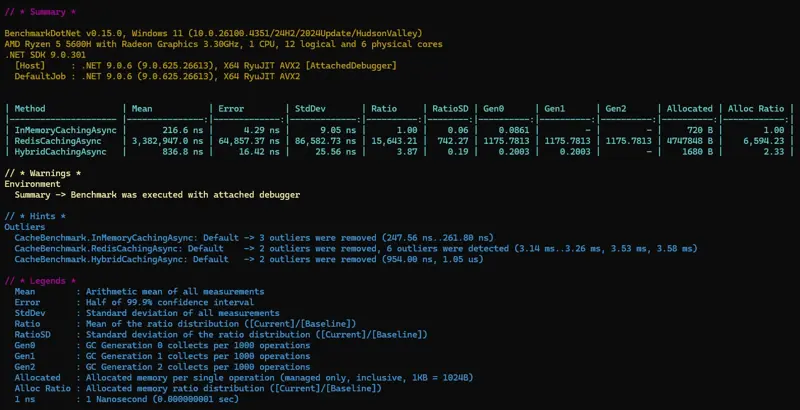
Hybrid Cache Benchmark
Summary
-
HybridCache combines L1 (in-memory) and L2 (distributed) caching for optimal performance and scalability.
-
Reduces database stress with stampede protection.
-
Easy to configure and integrates cleanly .
-
Ideal for both monoliths and microservices.
-
Delivers simplified caching with advanced features like tagging and serialization.
Related Reading: When it comes to speed and scalability in rate-limited environments, thread management often becomes a key aspect to be looked at - explore our Building Resilient C# Apps blog to know more about it.
References
Related Blogs

Building Resilient C# Apps
Avoiding Thread Starvation in Rate-Limited Environments
Vertical Slice Architecture In Modern Application Design
A modern approach that's becoming popular is Vertical Slice Architecture.

Cursor vs Offset Pagination in EF Core with Benchmarks
Pagination is the technique of splitting a dataset into smaller chunks (pages) instead of retrieving everything at once.